
Mechanical vs Magnetic Keyboards: Which One Is Worth Your Budget?
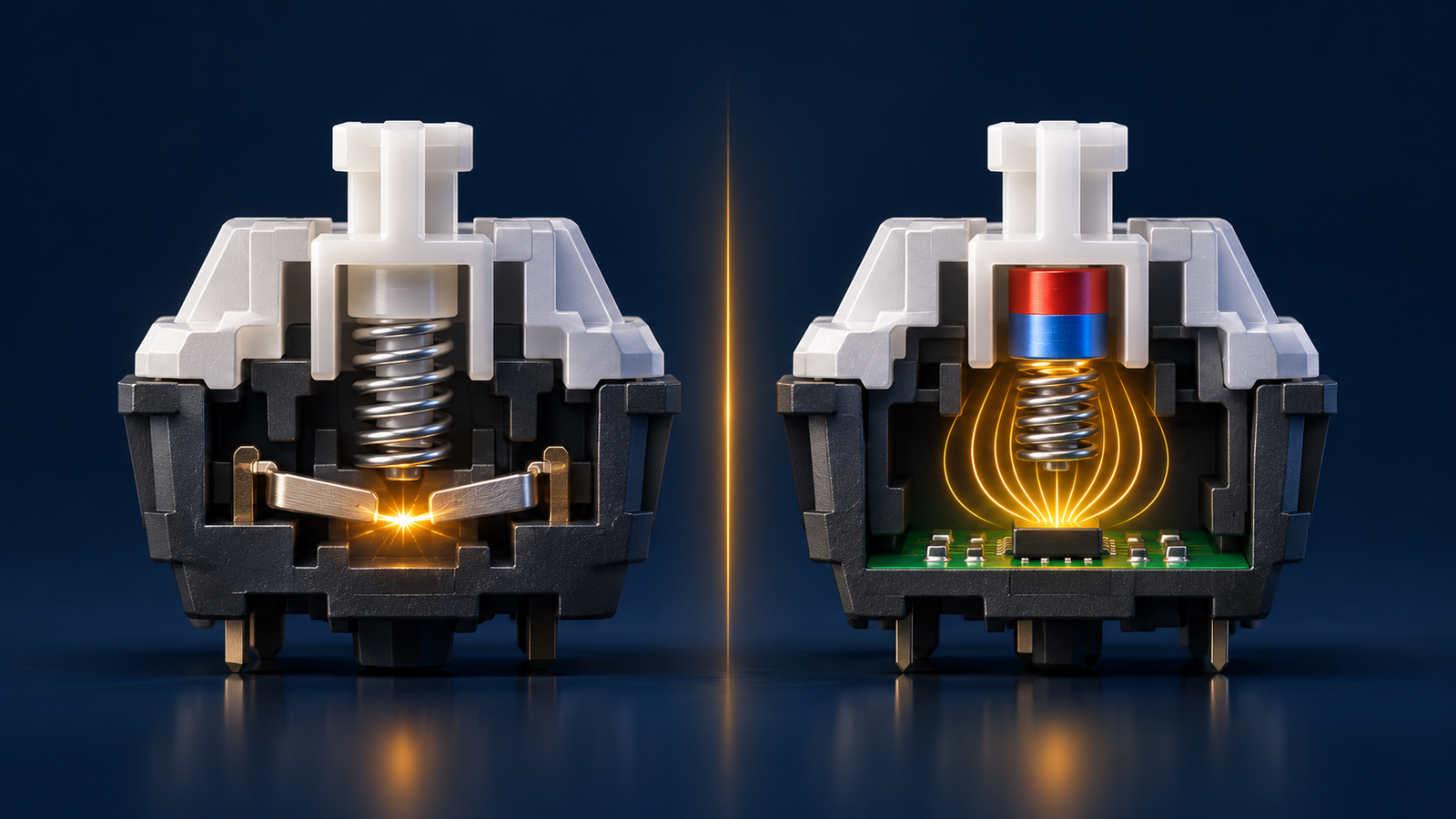
The difference between a mechanical and a magnetic keyboard is how each one registers a key press. A mechanical keyboard registers it when two metal parts touch inside the switch. A magnetic keyboard, also called a Hall Effect keyboard, measures the key's position with a magnet and a sensor, with no electrical contact.
In practice, mechanical keyboards usually cost less and offer more choice and more variety in feel. Magnetic keyboards let you adjust the actuation point and use Rapid Trigger, which is why they lead in competitive gaming.
This guide explains how each type works, when the extra cost makes sense, and when you don't need it at all.
How does a mechanical keyboard work?
Under every keycap sits a separate switch with a spring and two metal contacts. When you press the key, the moving part drops, the contacts touch, the circuit closes, and the press is registered.
This design is simple and has been proven for many years. That is why you will find mechanical keyboards in most price ranges, from budget models to advanced ones. If you are buying your first mechanical keyboard, you have plenty of choice in size, shape and lighting.
Switch types
Switches differ in feel and sound. The three best known types are:
Linear: smooth travel from top to bottom, with no bump or click. Many gamers prefer it.
Tactile: you feel a light bump during the press, so you know it landed. Comfortable for typing and mixed use.
Clicky: a bump plus a clear click sound. Fun for people who love typing, but annoying in a shared room.
A fixed actuation point
The actuation point is how deep a key must travel before the press registers. On a mechanical keyboard it is set by the switch itself. Its depth varies by type and manufacturer, but you cannot change it in the settings.
There is another limit. To press again, the key must rise above the reset point, which is also fixed. You won't notice this while typing, but it shows up in fast games.
How does a magnetic keyboard work?
A magnetic switch looks like a mechanical one from the outside, with a moving part and a spring. The difference is that the moving part carries a small magnet, and a Hall Effect sensor sits below it on the circuit board.
As the key drops, the magnet gets closer to the sensor and the magnetic field there changes. The sensor reads that change continuously, so the keyboard knows where the key is along its travel, not just whether it is pressed.
An adjustable actuation point
Because the keyboard knows the key's position, the actuation point becomes a software setting. You can choose a shallow point for gaming and a deeper one for typing, so you make fewer mistakes.
The available range varies by model, and you usually set it in the manufacturer's software. Some models let you set each key separately.
What is Rapid Trigger?
Rapid Trigger removes the fixed reset point. As soon as the key starts to rise it deactivates, and as soon as it moves down again it reactivates, wherever it is in its travel.
A practical example: in games like Valorant and Counter-Strike you need to stop moving quickly before you shoot. With Rapid Trigger, the movement command ends the moment you lift your finger slightly, instead of waiting for the key to pass a fixed point.
Is the speed difference big?
The difference is measured in fractions of a second, and you won't notice it while browsing or typing. Part of it comes from metal contacts bouncing for a moment when they close, so the keyboard adds a small debounce delay to stop a press from repeating.
A magnetic keyboard doesn't need that delay in the same way. But final performance also depends on the keyboard's firmware and its polling rate, so don't judge a model by its sensor type alone.
No contact, and what that means for lifespan
Registering a press here doesn't rely on metal contact, so there are no contact points to wear out. That avoids a common problem on older keyboards called chatter, where one press types two letters because the contacts have worn.
That doesn't mean it can never fail. The spring, keycaps, cable, port and circuit board can all be affected by use. Lifespan figures published by manufacturers vary by model, so don't rely on them alone.
Comparison table
| Feature | Mechanical keyboard | Magnetic keyboard |
|---|---|---|
| How it works | Metal contact closes the circuit | Magnet and sensor measure key position |
| Response speed | Fast, but actuation and reset are fixed | Faster in practice with shallow actuation and Rapid Trigger |
| Customization | Swap switches if the keyboard supports it | Set actuation and Rapid Trigger in software |
| Lifespan | Long, but contacts wear over time | No contacts to wear, other parts are affected by use |
| Sound and feel | Wide variety of Linear, Tactile and Clicky | Mostly Linear, sound depends on design and materials |
| Price | Many budget options | Usually higher within the same class |
| Parts and modding | Wide choice of switches and keycaps | Fewer switches, and they must be compatible |
Pros and cons
Mechanical keyboard
Pros:
Plenty of options for most budgets.
Wide variety in feel and sound.
Many replacement switches and keycaps, especially on hot swap models.
Works right away, usually with no setup or software.
Cons:
The actuation point is fixed, and changing it means changing the switch.
The traditional design doesn't support Rapid Trigger.
Contacts wear with long use.
Magnetic keyboard
Pros:
An actuation point you set for each game or task.
Rapid Trigger gives a real advantage in competitive games.
No metal contacts to wear out.
Cons:
Usually more expensive.
Fewer replacement switches, and compatibility varies by model.
Getting the full benefit depends on the software, and software quality varies by brand.
A very shallow actuation point can cause accidental presses.
Which one is right for you?
No type is best for everyone. The decision depends on what you actually do at the keyboard.
Competitive games (FPS)
Best fit: magnetic. This is where Rapid Trigger clearly pays off, especially in games built on precise movement. If you are looking for the best gaming keyboard for competitive play, start with this feature.
One example in this class is the Attack Shark R85 HE magnetic keyboard. It is a 75% layout with magnetic Purple Core switches and Rapid Trigger, and it connects by wired USB-C with RGB lighting. A compact size also leaves more room for your mouse, which helps if you play at low sensitivity.
Casual gaming
Best fit: mechanical. In story, strategy and open world games, you won't feel a difference that justifies the price. Any good mechanical gaming keyboard will do the job, so choose the feel you like.
Programming
Best fit: usually mechanical. A Tactile switch gives you clear feedback on every press, which is comfortable in long sessions. A magnetic keyboard also works well with a deeper actuation point, especially if you game on the same keyboard.
Watch the size too. Very small layouts can hide keys you use often, such as arrows and function keys, so check the layout before you buy.
Long typing
Best fit: mechanical with a Tactile or light Linear switch. Comfort matters more than speed here. Choose a switch that doesn't tire your fingers, and avoid Clicky if you type near other people.
If you are a student writing long reports, your hand position and keyboard height matter as much as the switch type.
Tight budget
Best fit: mechanical. You will usually get more value for your money, unless competitive gaming is your main goal. You can also follow the store's current offers, where you may find a suitable model at a better price.
A simple rule: don't pay for a feature you won't use. If you don't plan to open the software and adjust the settings, you won't get the main benefit of a magnetic keyboard.
Frequently asked questions
Is a magnetic keyboard a type of mechanical keyboard?
Both have keys that physically move on a spring, so you may see them under one category. But they register presses in a completely different way, and a magnetic keyboard doesn't rely on metal contact.
Will Rapid Trigger make me a better player?
It improves movement response, but it doesn't replace aim, practice or game sense. It helps most for players who have already mastered precise movement.
Can I fit a regular mechanical switch on a magnetic keyboard?
No. A magnetic keyboard needs a switch with a magnet that works with its sensors. Check compatibility with your model before buying a replacement.
Is a magnetic keyboard good for daily typing?
Yes, as long as you set the actuation point to a comfortable depth. A very shallow setting can increase typing errors.
Is a magnetic keyboard always the best gaming keyboard?
No. It is strongest in fast competitive games, but the gap gets much smaller in other games. A good mechanical keyboard remains a smart choice for most players.
Summary
If competitive gaming is your priority, a magnetic keyboard is worth the extra cost. For everything else, a mechanical keyboard remains an excellent choice and usually costs less.
If you are looking for a keyboard in Syria and haven't decided yet, browse our keyboards category. Or message us on WhatsApp, tell us your use and budget, and we will help you choose. We deliver to all governorates, and you can pay on delivery or with Sham Cash.